JavaScript Part 1
Getting started with an intro to functions,
variables and operators
Getting started with an intro to functions,
variables and operators
As the owner of the thriving store, Planet Robots, you have to make sure you have a top notch website.
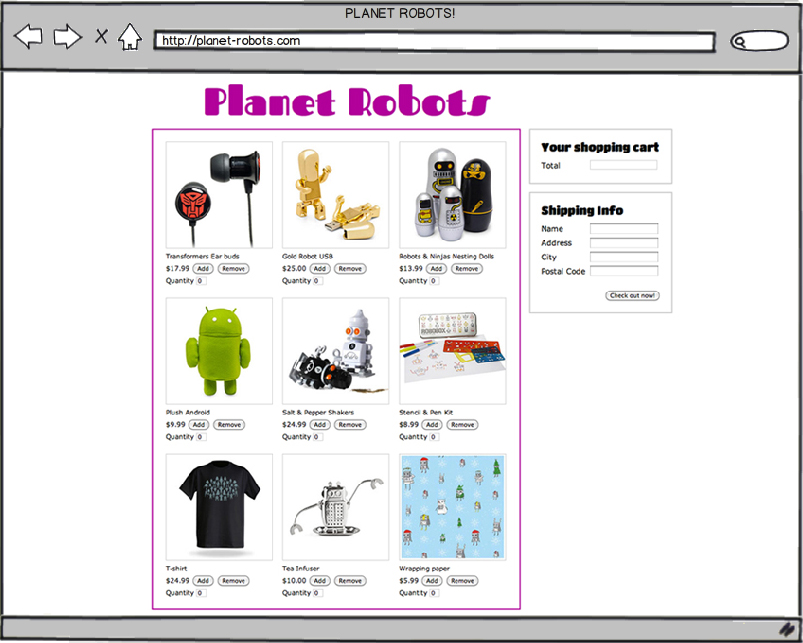
You'll want to do things like offer online shopping and print shipping labels!
You'll also want to make sure that everything works properly as well.
That means customers can't submit empty forms and product totals are calculated properly in their shopping carts.
In order to create a website that can handle these requirements, we will need to learn how to use variables and operators.
JavaScript can modify HTML
JavaScript can add HTML
JavaScript can remove HTML
JavaScript can animate HTML
JavaScript can modify HTML
Try it, click the Run button:
If we view source on the page, we'll see HTML like below.
Whatever was in the body before has been completely replaced!
Try it on Google.
Your mentor will show you how to open up the JavaScript Console (Opt+Cmd+j on mac, Alt+Ctrl+j on pc)
Then paste this code:
document.body.innerHTML = 'Hi!';
See how document.body.innerHTML relates to the HTML?
We can add a bunch of HTML using innerHTML.
Try adding your name along with some more HTML tags below:
Assignment Operators,
like equals (=), assign whatever is on the right to whatever is on the left.
document.body.innerHTML = "Hi!";
Read the above statement like this:
document dot body dot innerHTML equals Hi!
Remember that the left hand side gets completely replaced.
In the example below, the body will only contain "morning", since the second statement completely replaces whatever was there before.
Try running this code:
Rather than replacing the body with "morning" we can append.
To do that we would use plus equals (+=).
The plus equals assignment operator adds the right side to the left.
Now we'll add in some HTML again.
Play around with the code below, add some more HTML and a few extra lines of statements
Variables are used to store values so you can use them later.

Declare variables with the keyword var.
var twitter;
Assign a value to the variable using the equals (=) operator.
twitter = "@gavinuhma";
Now the computer will remember my twitter!
Take note that the value of the variable is written between quotes.
More on this soon.
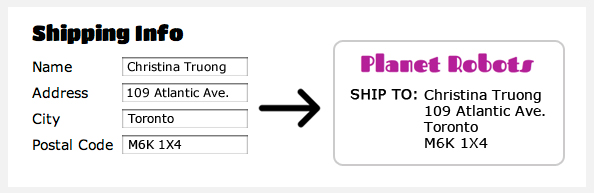
In a web checkout form that asks for your name and address, variables can be used to store this information. The stored information can then be used to create things like shipping labels.
End a statement with a semicolon (;).
Statements are commands that tell the computer what to do.
Ending the statement with a semicolon is like ending a sentence
with a period. It tells the computer that the statement is done.
You can also declare a variable and its value in one statement.
var twitter;
twitter = "@gavinuhma";
var twitter = "@gavinuhma";
Let's try creating some variables.
Below is an example of a variable for your name. Display the value using document.body.innerHTML.
IMPORTANT!
Using the equals (=) symbol in Javascript is NOT the same as in math.
var total = 1 + 1 means:
evaluate everything to the right of the equals sign (e.g. 1 + 1),
then assign this value (e.g. the number 2) to the variable on the left side.
You will see later that we can re-assign new values to an existing variable.
Variables can hold different kinds of values. We've been using strings so far but variables can also hold other kinds of values.
1. Numeric variable (integers & decimals)
var someIntegerNumber = 10;
var someDecimalNumber = 10.5;
2. Boolean variable (true/false)
var isSaturday = false;
var isSunday = true;
3. String variable (letters, words & sentences)
var singleWordString = "hello";
var sentenceString = "Hello, good day to you!";
var numberString = "10";
Only string values are written inside single or double quotes ('string' or "string").
Variables can't contain spaces. Use a convention called camel case.
Every new word is capitalized and the result looks likeCamelHumps.
JavaScript is case sensitive (uppercase and lowercase letters are treated differently) so variable names are also case sensitive.
Another convention is to use underscores to_separate_words. This is common in other programming languages (like PHP).
When naming a variable, it's best to give it a descriptive name.
It makes it easier to see, at a glance, what kind of value that variable is going to hold.
This is especially useful when sharing code with others who may not use the same kinds of abbreviations.
var firstName; ← Clear that first name will go here.
var fn; ← Not as obvious as firstName.
var x; ← Not clear at all.
Variables cannot start with a number or any special characters except for underscores (_) and dollar signs ($).
Although it's valid to use underscore or a dollar sign, they should only be used in special circumstances.
Whitespace refers to blank characters and includes spaces, tabs and line breaks.
JavaScript ignores whitespace except when used in a string.
// both statements are the same to JavaScript
var name="Christina";
var name = "Christina";
Sometimes you want to write notes to yourself (and others!!) to organize blocks of code or leave explanations. Use comments! JavaScript will ignore comments and not execute them.
// This is how you leave a single line comment.

// You can write many single line comments.
// Just make sure to add the double slash
// for every new line.
Here's another way to comment larger blocks of text.
/* This is how you leave
multi-line comments for when you
want to write a longer message */
Multi-line comments are great for "hiding" large blocks of code so you can try something new without erasing your old code.
We can also use JavaScript to do math using arithmetic operators.
Arithmetic operators in JavaScript are (+) for addition, (-) for subtraction, (*) for multiplication and (\) for division.
Getting JavaScript to do math can be very useful.
For example, we can use it to calculate totals in a shopping cart form.
Instead of using just numbers, JavaScript can do math using variables with numerical values.
Try it, set totalPrice to be tshirtPrice plus (+) androidPrice
Someone has checked out of our online store attempting to buy 1 t-shirt and 1 Android plushie.
Apply some arithmetic operations to get the final total after applying a 15% discount.
Steps:
subTotal given tshirtPrice and androidPricediscountAmount given subTotal and discountPercentagefinalTotal given subTotal and discountAmountIf you get stuck, click here for the full solution.
Or if you want to reset, click here for the original code.
Remember how there are different variable types? Arithmetic operators can only be performed on numerical values.
But numbers can come disguised as strings so be careful!
When the addition (+) operator is used on strings, it doesn't "add" values, it concatenates them.
Try it, change num1 to a string:
Unlike the other arithmetic operators, the (+) symbol has another purpose other than adding numbers. It is used to join strings together, also known as concatenation. You can concatenate variables, strings or a combination of both.
If you use the (+) operator with only numerical values, it will add the values. Otherwise, it will combine the outputs as a string.
Let's practice concatenating using variables and strings.
Even after a value has been set for the first time, we can still overwrite it and re-assign a new value.
For example, we may want to increase or decrease values.