JavaScript Part 2
Functions
Functions
Functions are used to make the code "do things." They are especially useful for repetitive tasks.
prompt()
and
document.write()
are two functions that are pre-written into JavaScript.
But sometimes you need to group tasks that aren't covered by one of the pre-written functions.
That's when we create our own!
To create a function, it needs to be defined first.
There are different ways to define a function, but the most common way is using the
function keyword.
The keyword is followed by the function name, of your choosing, and round brackets (). And finally, the code to be executed are enclosed within curly braces { }.
function nameOfFunction() {
  //code to execute
}
Let's define a function called sayMyName and use alert() to get the computer to "say" our names (functions can be used inside other functions too).
Note that the code within a function doesn't execute until it's called.
We've seen functions being called already!
  //Here's the syntax again
  function nameOfFunction() {
    code to execute
  }
The browser executes the JavaScript as soon as the page loads.
But sometimes you need to control when it executes, like when someone rolls over a navigation item or presses a Submit button, otherwise known as an event.
This is another way functions are used.
Note: You can even use onclick() on any HTML element
  <div onclick="sayMyName();">
    Click here to call the function!
  </div>
Run it and see what happens!
Let's create a one-product shopping page where you can update the
quantity by adding or removing it from the shopping cart.
Here's what it should look like:
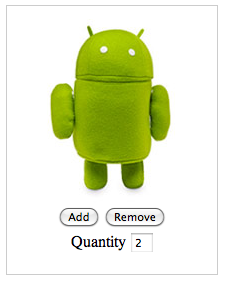
Use the quantity variable to keep track of additions and subtractions to the running total.
1. The "Add" and "Remove" buttons haven't been clicked yet so quantity needs to be initialized to a default value first. Replace the asterix with your answer.
2. Use your knowledge of arithemetic operators and variable assignment to re-calculate the value of quantity.
3. Same as step 2 above.
If you get stuck, click here for the full solution.
Or if you want to reset, click here for the original code.
Let's take another look at our code and see what the functions are doing.
<script>
  var quantity = 0;

  function addItem() {
    quantity = quantity + 1;
    refreshTotal();
  }
  function removeItem(){
    quantity = quantity - 1;
    refreshTotal();
  }

  function refreshTotal() {
    document.getElementById('updateQuantity').value = quantity;
  }
</script>

<!-- HTML and CSS -->
<link rel="stylesheet" href="http://gavinuhma.github.io/LLC-JavaScript/exercises/slides.css" type="text/css" media="screen" />
<div class="item">
  <img src="http://gavinuhma.github.io/LLC-JavaScript/exercises/assets/plush-android.jpg" width="195" height="195" />
  <br />
  <button onclick="addItem();">Add</button>
  <button onclick="removeItem();">Remove</button>
  <br />
  Quantity
  <input type="text" id="updateQuantity" value="0" readonly />
  <br />
  <br />
  Total Cost:
  <input type="text" id="updateTotal" value="0" readonly />
</div>
Let's re-visit the Quantities exercise and add a text field to show the total cost. If the Android plushie cost $20 each, how do we calculate the total cost?
› Created & defined by using the function keyword
› Used to group together related lines of code and store them into descriptive names
› Can be reused just by calling the function name
› Define the function first but it will not run until you call the function
› Can be used inside another function
Let's order a pizza! The orderPizza() function below represents all the steps it takes to place an order (find the pizza place's phone number, call them, give them your address, etc).
Inside the function is where the pizza restaurant will hold our options choices (toppings, crust type and size of pizza). Now they can use this stored information to make our order.
What if we want to order another pizza but with different options?
Let's order another pizza by creating another function.
Let's say the pizza place always want to include cheese as a basic topping in all of the pizzas. We can declare a
baseTopping
variable outside of the function so it can be accessible from anywhere in the program.
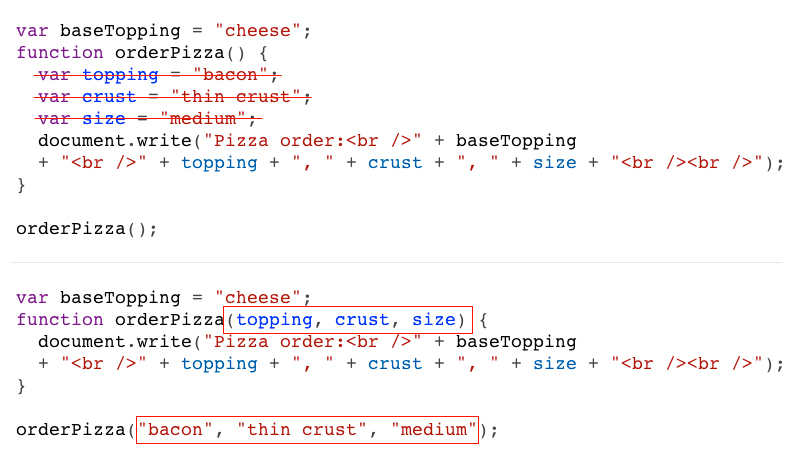
This could get cumbersome if we wanted to make a lot of pizzas. How can we re-use the makePizza() function instead of creating multiple functions? We use parameters.
Functions can be used with one parameter, more than one parameter or none at all.
Functions are more flexible when used with parameters because variables can be passed into the function.
In the makePizza() function, the variables from inside the function were removed and added as parameters. Now when we call the function we can pass the values right into the function.
JavaScript can appear
inline
in a webpage in several spots. Either in the
<head>
section or anywhere in the
<body>
section.
 <html>
 <head>
   <title>JavaScript example!</title>

   <script type="text/javascript">
     alert("I'm in the head tag!");
   </script>

 </head>
 <body>
   <div id="example">This is an example.</div>

   <script type="text/javascript">
     alert("I'm in the body tag!");
   </script>

 </body>
</html>
Need to manipulate an html tag or have a quick loading page? Put the JavaScript just before the
closing
<body>
tag.
Go to the exercises folder and open up pizzaMaking.html
(Psst: It's also in the ZIP folder that you downloaded earlier today.)
Most computers are set to open .html files in the default web browser so right-click (Command+click or 2-finger click on Mac) and select the "open with..." option.
Uh oh!
This is almost the same code as previous. Why isn't it making pizza? :(
Take note of how your code is being coloured. It's the first sign of a possible syntax error and will save you headaches later.
Some editors do a better job than others -- that's what you pay for sometimes.
1. Using pizzaMaking.html as an example, create a new .html file named wingMaking.html.
2. Use inline JavaScript and write a new function that makes wings with these 3 variations:
3. Use function parameters and a single function to make the job of creating multiple types and flavours of wings easier -- versus writing multiple wing making functions.
If you're really stuck, go to the solutions folder and open up wingMaking.html