JavaScript Part 4
Objects
Objects
If variables are boxes, OBJECTS can be thought of as bento boxes -- "advanced variables" if you will.

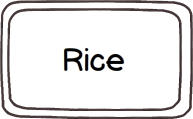
|
A basic variable only holds one value. var takeout = "Fried Rice"; |
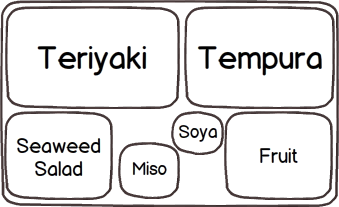
|
An object holds a collection of values. // create a new object
var bentobox = {};
// fill it with stuff
bentobox.main = "Teriyaki";
bentobox.side = "Tempura";
bentobox.salad = "Seaweed Salad";
bentobox.soup = "Miso";
bentobox.sauce = "Soya";
bentobox.dessert = "Fruit";
|
Creating an object is easy. Just like any other variable, use the var keyword and give it a descriptive name.
But instead of assigning a single value right away, use these curly braces to make an empty object.
var bentobox = {};
Yes, it's weird but think about the {} as a sort of funky container.
The "compartments" of objects are called PROPERTIES.
If you already have an existing object, there are a few ways to access and set a value to a property. Since these two are very commonly used, they will both be discussed.
Dot notation:myObject.property = value;
bentobox.main = "Teriyaki"; bentobox.side = "Tempura"; |
Key-Value Lookup:myObject[key] = value;
bentobox["main"] = "Teriyaki";
bentobox["side"] = "Tempura";
This will be most useful after you understand arrays. Advantage: You can use concatenation with the key string in order to do look up something that's partially dynamic: |
|
bentobox.soup0 = "Miso"; bentobox.soup1 = "Udon"; |
bentobox["soup"+1] = "Miso"; bentobox["soup"+2] = "Udon"; |
Advanced sidenote:
Alternatively, you can both declare an object and set it's values at the same time:
var bentobox = { soup:"Miso", main:"Teriyaki" };
Advanced topic: Objects are useful because you group all these properties together and you can reuse the object over again.
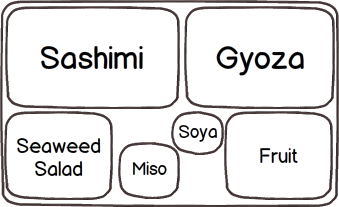
There's an expectation of what you'll get in a bento box.
Some items are fixed (a fruit dessert, a miso soup) but some compartments can be edited (a gyoza side versus tempura).
|
 |
When I said that objects were "advanced variables", here's another way of looking at it:
All JavaScript variables can be treated like objects too.
If curly braces are a container for a generic object, quotes are containers for characters. When we get to arrays next, you'll see that it uses square brackets. (The only "uncontainered" object we've introduced today was a number.)
var stringObject = “ ”;
var arrayObject = [ ];
Some objects are simpler than others but almost everything in JavaScript has properties available to us.
*Again, I need to oversimplify. The concept called DATA TYPE is a hairy topic. For more info: http://javascriptweblog.wordpress.com/2010/09/27/the-secret-life-of-javascript-primitives/ and http://www.2ality.com/2011/03/javascript-values-not-everything-is.html
In this workshop we won't be creating any of our own objects but JavaScript already has many objects built into the language.
Let's look at a string object and the length property which returns the number of characters in a string. Try putting your own name in here.
Previously, we talked about functions as blocks of re-usable code. This might sound crazy but you can store functions in variables too!
This function...
function sayHello(){
  document.write("hello");
}

sayHello();
|
➞ |
is the same as:
sayHello = function() {
  document.write("hello");
}

sayHello();
|
| ↆ | ||
But now look at this!
var welcomeTeam = {};
welcomeTeam.sayHello = function() {
  document.write("hello");
}
welcomeTeam.sayHello();
|
When a function is associated with an object we call it a METHOD.
Let's say you're having a robot sale! Everything is 50% off. But, after doing the math, you notice that the sale price is a bit off.. Let's declare a sale price and manipulate it using toFixed(). When you use a method, it gives you access to all the hard work that someone else did and it only takes you one line to use it!
Here's another METHOD associated with strings.
Have you ever created an email newsletter? You usually have a template but you want to replace [First Name] with someone's actual name. Use .replace() for that!
length and toFixed() are only two of many (many!) more built-in properties and methods of objects in JavaScript.
Check out this list: http://www.scribd.com/doc/19457597/Javascript-Methods.
Or this cheatsheet: http://www.addedbytes.com/download/javascript-cheat-sheet-v1/png.